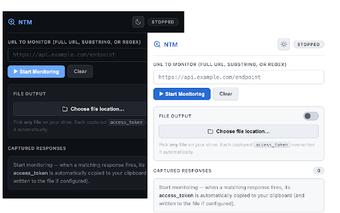
NTM: Chrome extension for targeted network response capture and tokens
NTM (Network Response Manager), created by Grzegorz Cagara, is a Chrome extension that captures and manages specific network responses for debugging and API testing. It monitors responses by URL patterns, automatically extracts fields such as 'access_token', and copies them for immediate use in development workflows. The extension can also save captured response data directly to local files and runs as a lightweight background tool. It is aimed at web developers, testers, and security researchers who handle authentication and API troubleshooting.
What NTM is built to do for API and authentication workflows
NTM targets focused network inspection by watching responses that match URL patterns, then extracting fields developers care about. The tool identifies and copies the 'access_token' field from JSON responses so tokens are available without manual parsing. Typical uses include API testing, authentication debugging, and collecting response samples for offline analysis. Users can treat the extension as a specialist capture utility rather than a full traffic explorer.
How light NTM runs and what that means for browser load
NTM keeps resource overhead low by design, with a file size of approximatelyKiB and a stated lightweight architecture for background operation. The extension captures responses without requiring the full developer tools panel, which reduces the need to keep heavy inspection windows open during normal browsing. That design choice preserves desktop responsiveness while active in the background.
How NTM handles sensitive-field extraction and local storage
NTM automates sensitive-field handling and local export by extracting the 'access_token' field and allowing captured network data to be saved directly to local files. Because exports are written to local storage, captured responses can be archived or consumed by test scripts without routing through external services. This local-first approach supports workflows that require offline token retrieval and data logging.
Who benefits from NTM and where a broader toolset is preferable
NTM suits users who need a narrow, single-purpose utility rather than a multipurpose inspector. The extension's minimalist focus on one workflow reduces setup for token capture but also means it does not replace full-featured network debuggers when protocol-level analysis or extensive visualization is required. The tool is available as a Chrome extension for desktop platforms, fitting developers who work inside that browser environment.
NTM is a focused choice for specialists who need a compact capture tool
NTM is a practical option for developers and testers who prefer a narrowly scoped utility for targeted network tasks; its single-purpose approach reduces peripheral complexity but limits deep protocol inspection. For broader debugging, pair the tool with a full network inspector. Practical tip: use the extension during specific test sessions and keep it inactive otherwise to limit unnecessary captures.